
Yes, VOD on IPTV is real, and it usually works if your login type and player both support it. The two biggest factors are whether your provider issued an Xtream-style login (not just a plain M3U link) and whether your player actually renders a Movies/Series section instead of dumping everything into one channel list.
Run these two checks first:
- Open your player’s settings and see if your credentials show as “Xtream Codes API” rather than a bare M3U URL.
- Look for a dedicated Movies or Series tab, not just a scrolling channel grid.
Three likely outcomes: VOD shows up and plays cleanly (you’re set), VOD is missing entirely (check your login type below), or VOD shows but won’t play specific titles (skip to troubleshooting).
Key Takeaways
VOD on IPTV depends on your login type and player, and switching from a flat M3U to an Xtream-style API login resolves most missing-movies problems.
| Point | Details |
|---|---|
| Check your login type | Xtream-style API logins expose separate Movies and Series endpoints; plain M3U often doesn’t. |
| Use a VOD-aware player | TiviMate, IPTV Smarters Pro, and Kodi all render VOD properly when set up with Xtream credentials. |
| Diagnose in order | Confirm login type, test a second player, check playlist structure, then review app logs. |
| Match bandwidth to quality | Aim for 10 Mbps for HD and 25 Mbps for 4K VOD with hardware decoding. |
| Choose a full-featured provider | Digitalwebb01 includes Xtream-style access, 70,000+ movies and series, and 4K/8K streaming out of the box. |
Table of Contents
- What Does VOD Mean on IPTV, and How Is It Delivered?
- Why M3U, Xtream API, and Portal Logins Change What VOD You See
- How Do You Access VOD in TiviMate, IPTV Smarters Pro, or Kodi?
- Why Does VOD Break, and How Do You Fix It?
- What Should a Full VOD-Enabled IPTV Provider Offer?
- Why “VOD Doesn’t Work” Is Usually a Config Problem, Not a Content Problem
- Is All IPTV Content Legal to Watch?
- Want VOD That Actually Works Out of the Box?
- Sources
What Does VOD Mean on IPTV, and How Is It Delivered?
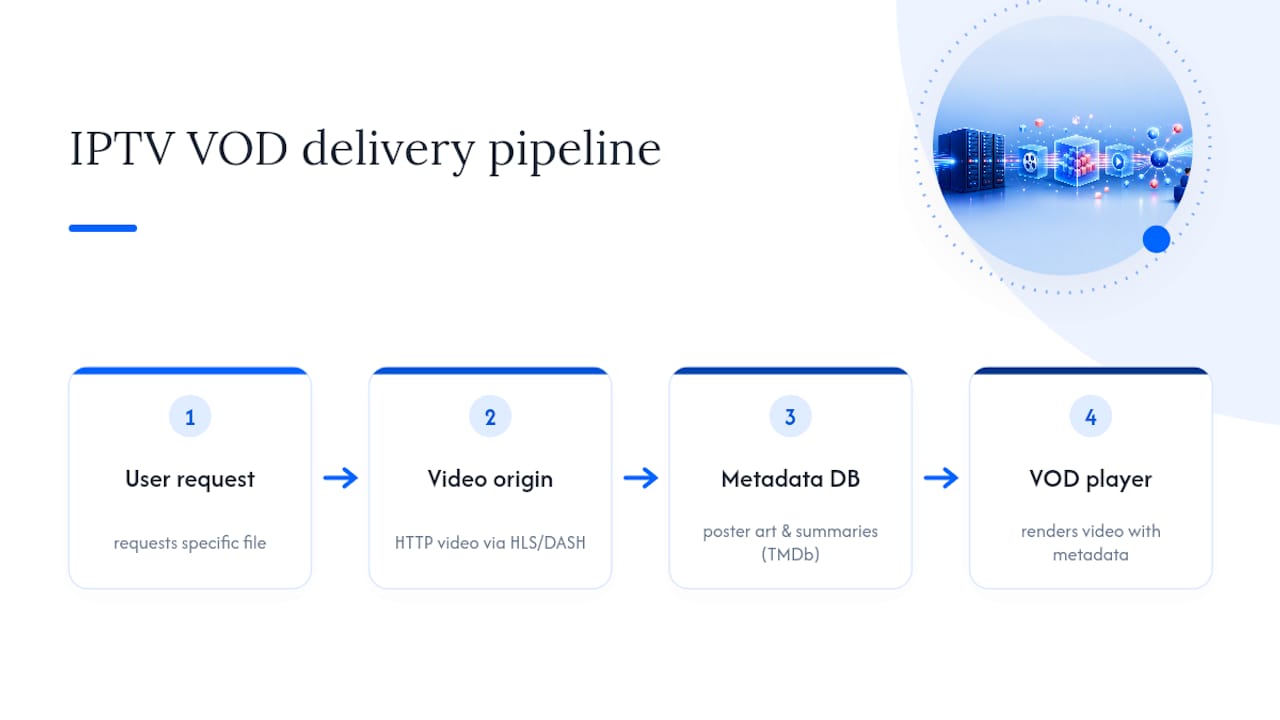
Live TV and VOD are technically different animals riding the same connection. Live channels are a continuous broadcast you tune into. VOD is a specific file you request, similar to how Wikipedia describes video on demand: a stored media file served on request rather than a scheduled stream. That distinction is why some IPTV setups nail live TV but fumble movies and series entirely.
Under the hood, VOD typically travels over HTTP using HLS or DASH, the same general transport as live IPTV but pointed at a file instead of a live feed. What changes the experience is metadata. A VOD-aware player pulls poster art, plot summaries, and season/episode structure from databases like TMDb, and without that layer, even a massive movie library looks like a wall of file names, according to IPTV One’s breakdown of VOD delivery.
Pro Tip: If VOD looks broken, check your player’s debug or connection log before anything else. It usually shows the exact API call that failed, which saves you from guessing.
Why M3U, Xtream API, and Portal Logins Change What VOD You See
Not every IPTV login exposes VOD the same way, and this is the single biggest reason readers report “no movies” even when their provider clearly offers them.
- M3U playlists list every channel and VOD item as a flat line. They can technically include movies, but there’s no structure separating a live channel from a season 3, episode 8 entry.
- Xtream Codes-style API logins query separate endpoints for live channels, movies, and series, letting the player build organized libraries automatically, per Tuneline’s explanation of how VOD libraries render.
- Stalker/portal logins work similarly to Xtream, exposing structured catalogs, though the exact format varies by middleware.
If your provider only handed you an M3U link and you want real VOD navigation, ask for Xtream credentials instead. That single swap fixes more “missing VOD” complaints than anything else.
How Do You Access VOD in TiviMate, IPTV Smarters Pro, or Kodi?
Getting to your movies and series depends on how you added your service, and a few settings tweaks make the difference between a scrolling mess and a proper library.
- TiviMate: Add your service using the Xtream Codes login option (not the M3U URL field), then check the Movies and Series tabs on the home screen.
- IPTV Smarters Pro: Select “Login with Xtream Codes API” during setup; a dedicated VOD player variant even exists for users who want a movies-first interface, per its Google Play listing.
- Kodi: Install an IPTV-compatible add-on, point it to your Xtream credentials, and confirm the add-on’s VOD catalog populated separately from live channels.
Device matters too. Apple TV, Fire TV Stick 4K, and modern Android TV boxes handle 4K VOD and H.265 decoding far better than older streaming sticks. Windows apps are fine for testing but rarely match a dedicated TV app’s playback stability.
When evaluating any player, look for poster art, genre filters, season/episode grouping, and resume-playback support. Those four features separate a genuinely usable VOD experience from a glorified file browser.

Why Does VOD Break, and How Do You Fix It?
Run these steps in order before contacting support. Most VOD problems resolve somewhere in the first three checks.
- Confirm your login type. If you’re on M3U and want full VOD navigation, request Xtream credentials from your provider.
- Test a second player. If TiviMate shows broken VOD but IPTV Smarters Pro doesn’t, the issue is app-specific, not your subscription.
- Check playlist structure. A flat M3U can include VOD entries but often hides proper series navigation, as Tuneline notes about how unstructured playlists behave.
- Review player logs. Look for failed API calls, timeout errors, or 404s on specific stream URLs.
- Confirm your plan includes VOD. Some cheaper packages are live-only.
For smooth playback, aim for at least 10 Mbps for HD and 25 Mbps for 4K VOD, paired with a device that supports hardware H.265 decoding. Also check container and codec compatibility (H.264 vs H.265, subtitle format) since mismatches cause stuttering or subtitle failures even on a fast connection. If you still need support, gather a screenshot of the error, your player’s log export, and one sample stream URL. That’s the minimum a technical support team needs to diagnose the issue fast.
What Should a Full VOD-Enabled IPTV Provider Offer?
A provider built for real VOD, not an afterthought, should check every one of these boxes:
- An Xtream-style API or portal login, not just M3U.
- Separate Movies and Series endpoints with proper metadata.
- 4K VOD availability alongside HD/FHD options.
- Subtitle support across major languages.
- A large, regularly refreshed catalog rather than a static list.
When you’re vetting a service, ask support directly: “Do I get an Xtream login, and is VOD included on my plan?” Their answer tells you almost everything. Testing dimensions like library size, 4K support, device compatibility, and server uptime are exactly what separate a solid VOD provider from a shaky one, according to iLounge’s comparison of top IPTV providers.
Why “VOD Doesn’t Work” Is Usually a Config Problem, Not a Content Problem
Most VOD complaints trace back to configuration, not a lack of assets on the provider’s end. When a player logs in with Xtream credentials, it makes distinct calls (commonly something like get_vod_streams or get_series) that return structured JSON the player renders as a browsable library. A flat M3U skips that handshake entirely, so even a provider with 70,000 movies looks empty if the player can’t query them properly.
The gap between “provider has no VOD” and “provider has VOD but you’re on the wrong login” accounts for the overwhelming majority of missing-movies complaints. Switching from M3U to an Xtream-style login is the fix nine times out of ten.
Is All IPTV Content Legal to Watch?
Availability on an IPTV service does not automatically mean the content is licensed. Some VOD catalogs include properly licensed movies and series, while others include streams that violate copyright, and it’s on the subscriber to use judgment.
- Favor providers who are transparent about content sourcing and licensing.
- Stick to paid subscriptions for copyrighted movies and shows rather than free, unverified sources.
- Read the Terms of Service before subscribing, and check a provider’s refund policy so you understand your protections if something doesn’t match what was advertised.
A Publisher’s Note on API-Based VOD
Working through enough IPTV setups makes one pattern obvious: API-based logins consistently deliver more reliable VOD than flat M3U links. That’s why Digitalwebb01’s troubleshooting advice leans hard on Xtream-style access whenever VOD navigation matters.
Want VOD That Actually Works Out of the Box?
Digitalwebb01 skips the M3U guesswork entirely. Every subscription ships with Xtream-style API access, so Movies and Series show up as organized, browsable libraries instead of flat file dumps, backed by a catalog of over 70,000 movies and series alongside 45,000 live and sports channels.
Before you commit, check the channels and VOD library to see exactly what’s included, then follow the setup guide to get your Xtream credentials running in minutes. If it’s not the right fit, the refund policy has you covered.
Sources
- IPTV VOD & Movies: How On-Demand Libraries Work in a Player | Tuneline
- IPTV VOD Guide: Watch Movies & Series via IPTV (2026)
- Video on demand — Wikipedia
This article is general information, not a substitute for advice from a qualified lawyer. Consult a qualified legal professional about your own circumstances before acting on anything here.